If I was to write One-Page PRD with AI
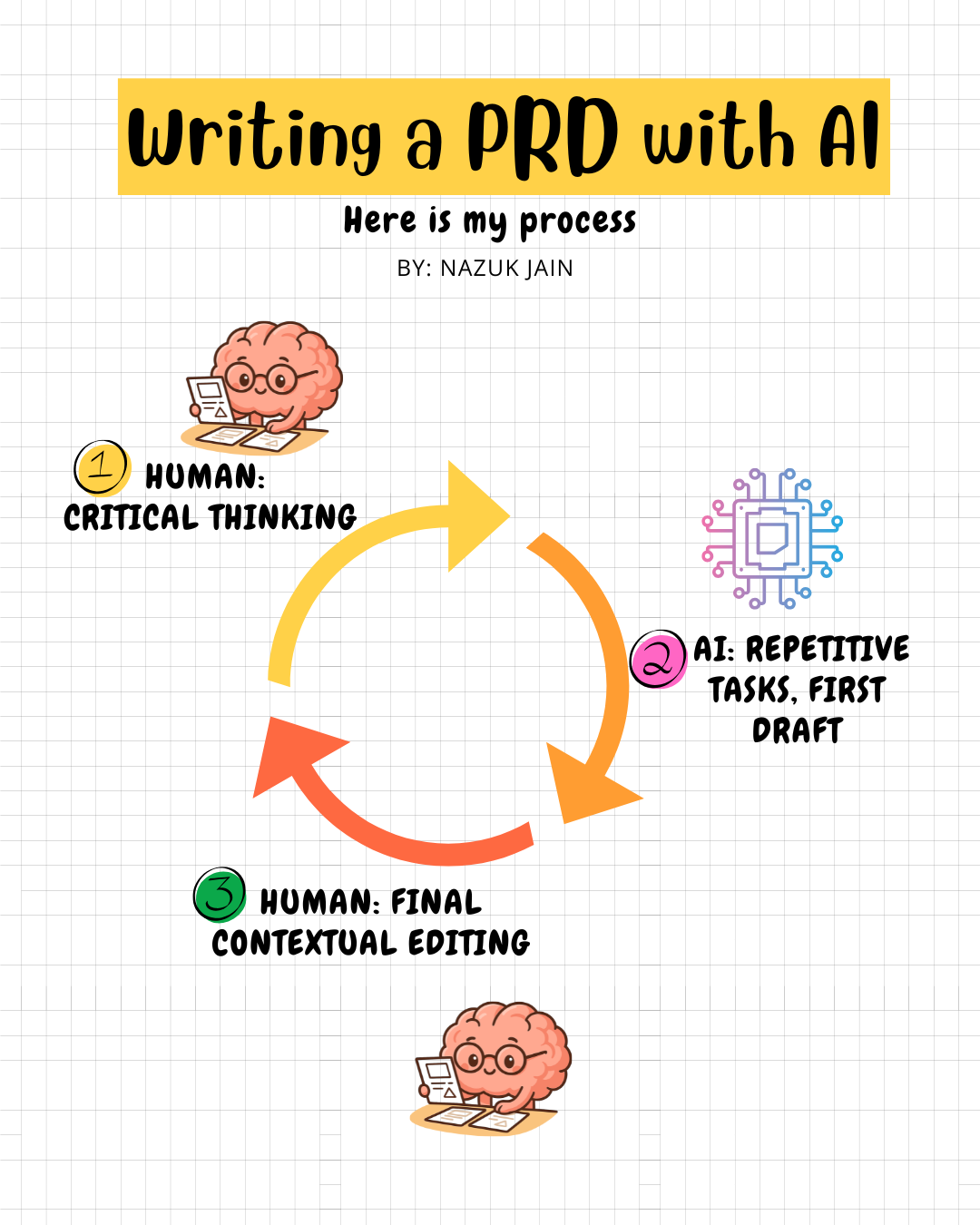
Human: Critical thinking -> AI: repetitive tasks, First draft -> Human: Final Contextual editing
Before we dive into today’s topic, I ask,
What Makes a One-Pager PRD Actually Work?
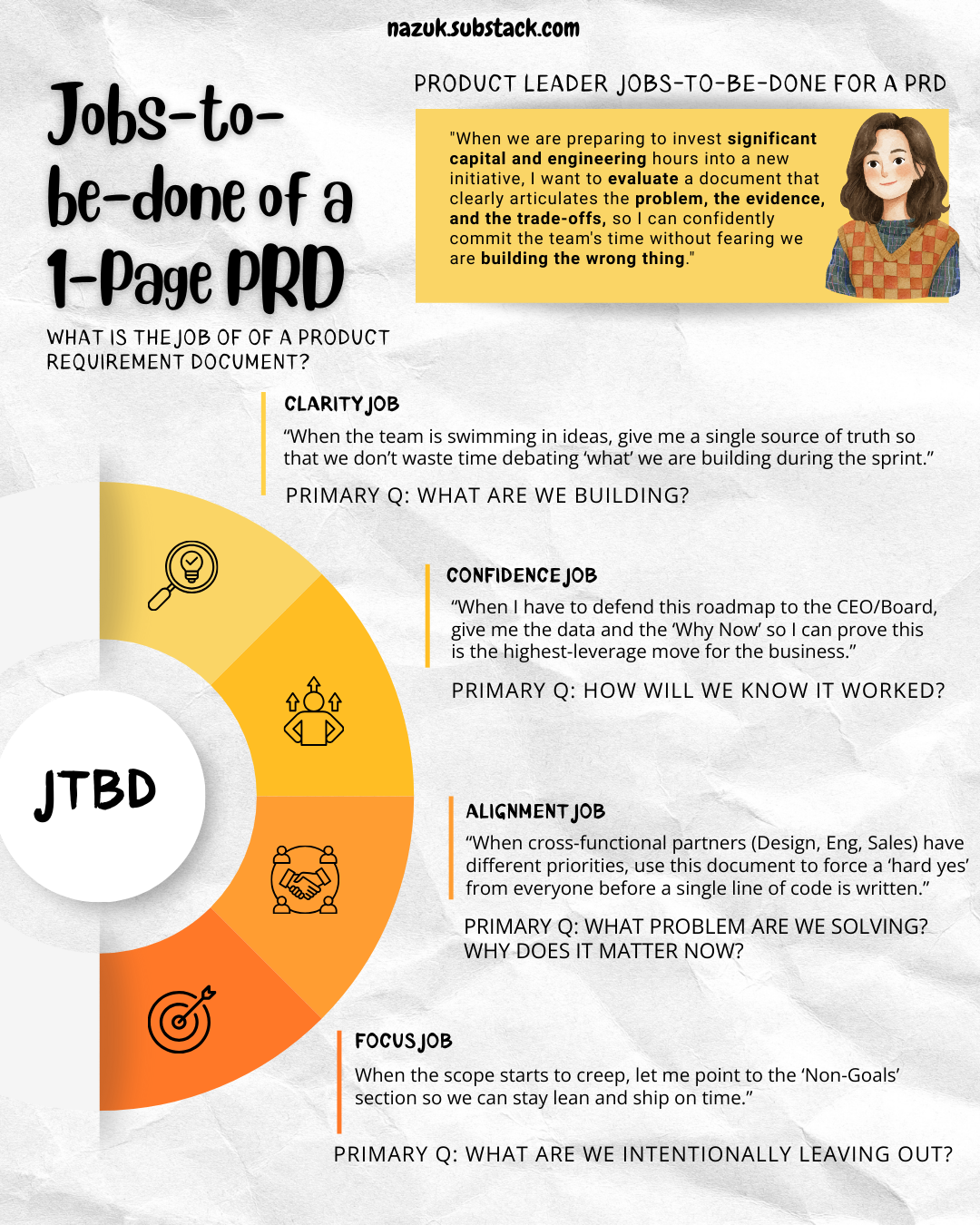
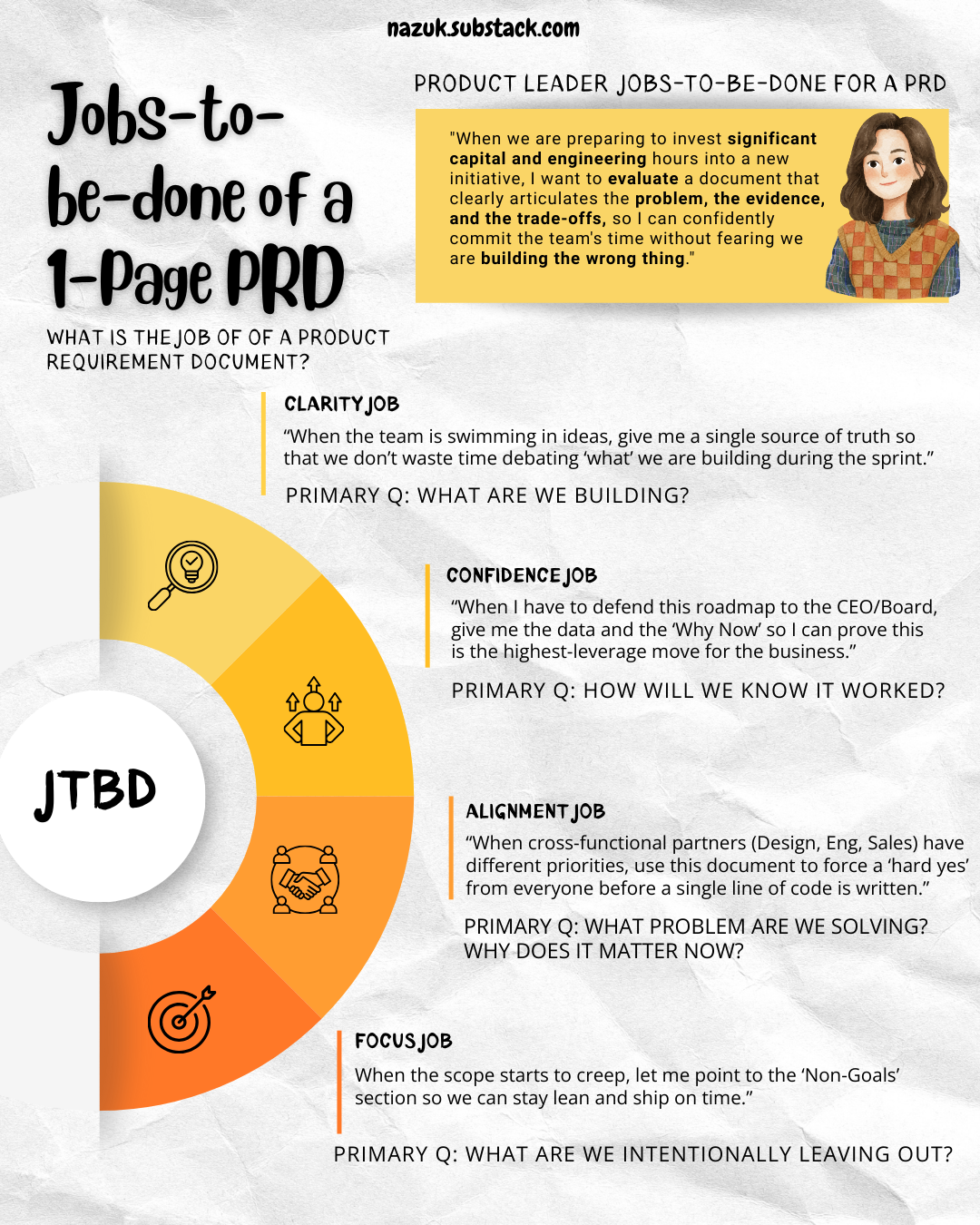
What is the JTBD (job-to-be-done) of a PRD?
[Note: Link to the PRD template is included at the bottom]
I think these primary words come to mind: Decision, Alignment, Risk Management, Accountability, Problem Definition, Metrics, North Star.
The PRD serves as a decision document rather than just a technical specification.
So I’d define a product leader JBTD for a PRD will be something like this.
"When we are preparing to invest significant capital and engineering hours into a new initiative, I want to evaluate a document that clearly articulates the problem, the evidence, and the trade-offs, so I can confidently commit the team's time without fearing we are building the wrong thing."
Here’s the thing about one-pagers: they’re not miniature specs.
They’re decision documents.
A good one answers five questions clearly enough that someone can read it once and understand what you’re doing and why. But I’ll break down the “Jobs” of a PRD.
The Clarity Job: “When the team is swimming in ideas, give me a single source of truth so that we don’t waste time debating ‘what’ we are building during the sprint.”
PRIMARY Q: What are we building?
The Confidence Job: “When I have to defend this roadmap to the CEO/Board, give me the data and the ‘Why Now’ so I can prove this is the highest-leverage move for the business.”
PRIMARY Q: How will we know it worked?
The Alignment Job: “When cross-functional partners (Design, Eng, Sales) have different priorities, use this document to force a ‘hard yes’ from everyone before a single line of code is written.”
PRIMARY Q: What problem are we solving? and Why does it matter now?
The Focus Job: “When the scope starts to creep, let me point to the ‘Non-Goals’ section so we can stay lean and ship on time.”
PRIMARY Q: What are we intentionally leaving out?
If you nail those five primary questions, anyone reading your PRD; whether they spend thirty seconds or three minutes on it—will walk away with what they need.
How to Structure It
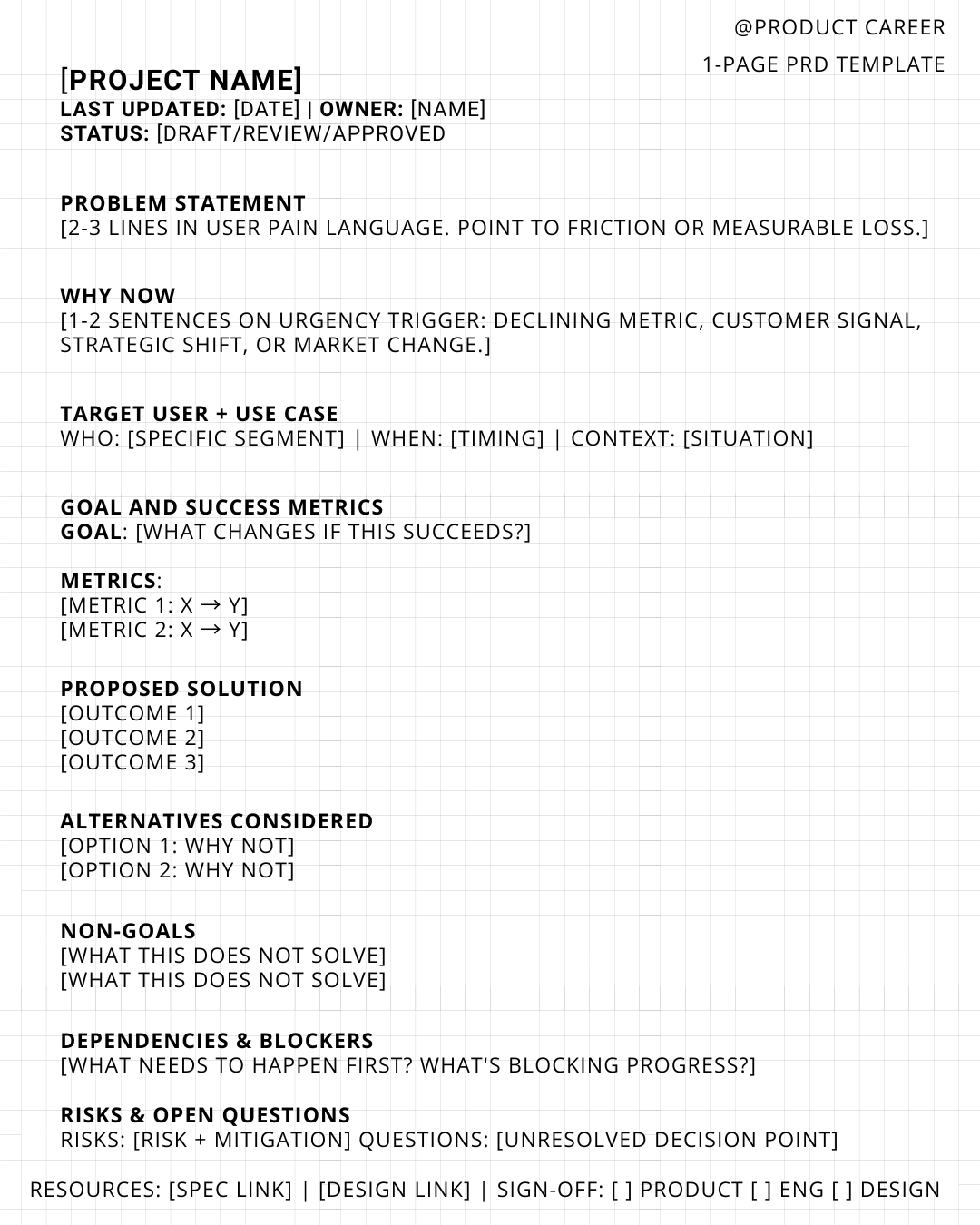
1. Problem Statement
Keep this to two or three lines, and write it the way your users would describe their pain, not the way you’d describe a feature.
So instead of writing “We need to improve onboarding flow,” try something like “New users drop off before completing setup because they don’t understand the value fast enough, leading to a 42% activation failure rate.”
The rule here is simple: if you can’t point to actual friction or measurable loss, you don’t have a problem worth solving yet.
2. Why Now
This is your urgency anchor. You need to explain why this problem deserves attention right now and not three months from now. Maybe a key metric is trending the wrong way. Maybe you’re seeing a spike in customer complaints or churn. Maybe there’s a strategic shift happening or a regulatory change forcing your hand.
Whatever it is, keep it short and make it clear why waiting would be a mistake.
3. Target User and Use Case
Get specific here. Don’t just say “users.” Tell me exactly who you’re talking about, when they’re experiencing this problem, and what context they’re in.
Instead of “users,” write something like “first-time SMB merchants signing up without prior payments experience.” Then add when this matters and what situation they’re in. This specificity is what prevents scope creep later when someone inevitably says “but what about enterprise customers?” and you can point back to this section.
4. Goal and Success Metrics
Split this into two parts. First, describe the goal: what actually changes for the user or the business if this works? Then list one to three metrics that will prove it. No vanity metrics allowed.
For example, your goal might be to reduce time to value, and your metrics could be “activation rate from 58% to 70%” and “time to first value reduced from three days to thirty minutes.”
If you can’t measure whether something worked, it’s not ready to build.
5. Proposed Solution
This is the high-level view, not a design document. Use bullets and focus on outcomes, not UI minutiae.
You might write something like: “Progressive setup with contextual education,” “Clear value preview before full commitment,” and “Automated defaults to reduce decision fatigue.”
If engineering needs pixel-perfect specs, that comes later. Right now you’re just painting the picture of what success looks like.
6. Alternatives Considered
Briefly mention what else you looked at and why you didn’t go that route. This section shows you’ve done your homework and thought through the options.
For instance: “We considered a full onboarding redesign but that would delay impact by six months. We also looked at an email drip campaign, but that doesn’t address the in-product friction where people are actually dropping off. We chose progressive setup because it’s the fastest path to measurable improvement.”
Only include this if you actually evaluated real alternatives. Don’t manufacture options just to fill space.
7. Non-Goals
This is where senior PMs separate themselves. Explicitly state what this does not solve. It protects your focus and your credibility.
You might write: “This does not redesign the full onboarding experience. It does not address post-activation retention. It does not introduce new pricing or plans.”
When someone asks you six weeks from now why you’re not tackling X, you can point right here.
8. Dependencies and Blockers
In one or two lines, call out what needs to happen before you can move forward or what’s happening in parallel.
Something like: “Requires analytics instrumentation update—eng team has capacity in Q2” or “Blocked on legal review of new consent flow.”
This prevents surprises during planning and shows you understand how your work fits into the broader system.
9. Risks and Open Questions
Show that you’ve thought ahead. List a couple of risks and what you might do about them. Add any questions you haven’t fully resolved yet.
For example: “Risk: Over-simplifying may reduce flexibility for power users. We’re considering an advanced mode toggle.” And “Open question: Do we gate advanced options behind setup completion or allow access anytime?”
This builds trust. It shows you’re not glossing over the hard parts.
Making It Actually Crisp
- One page means one page. If you’re spilling onto a second page, you haven’t prioritized ruthlessly enough. Cut until it fits.
- Write it like a decision memo, not a reference document. This isn’t something people should file away and forget. It’s something that should drive action.
- Use numbers whenever possible. Metrics beat adjectives every time. Don’t say “significantly better”—say “70% faster.”
- Avoid hedging. Words like “might,” “could,” and “potentially” make you sound uncertain. If you’re not sure, figure it out before you write the PRD.
- If a sentence doesn’t change a decision, delete it. Every word should earn its place.
- Lead with the punchline. Put the most important insight first in every section. Busy readers should get value from the first sentence even if they don’t finish the paragraph.
- Make it skimmable for three audiences. Your PRD will be read by PMs who want details, engineers who want clarity on scope, and executives who want ROI. Bold key phrases so each group can extract what they need in thirty seconds.
- Date it and version it. Add “Last updated: [date]” at the top. This tiny detail prevents the “wait, is this still the plan?” conversation when someone finds your PRD in Slack six months later.
- Link to detailed specs if they exist. One line at the bottom: “Full technical spec: [link].” The one-pager stays focused, but you give people an escape hatch if they need more.
- Test it on someone outside your team. If they can’t explain the problem back to you after reading, it’s not clear enough. The best one-pagers work even for people who know nothing about the project.
The Final Test: Before you share it, ask yourself one question: “If I had three minutes with leadership, could I walk them through this without opening another doc?” If the answer is yes, you’re ready. If not, keep cutting until it is.
Here is LINK to PRD Template you can download from Notion
Writing a PRD with AI
Writing a PRD with is much more nuanced, unless you are using internal LLMs, I suggest to use external LLMs for PRD generation with caution because of your proprietary data.
If I was to write a PRD with AI, Here is my process.
Not sure who first started the term ‘human-in-the-loop,’ but it’s fitting here.
I don’t try to “one-shot” the PRD. It is the foundation of any project.
Human: Critical thinking -> AI: repetitive tasks, First draft -> Human: Final Contextual editing
I gave it a stab to curate a prompt that can help facilitate writing a sharp PRD. but at the end of the day, it is up to the you to still make sure of it’s accuracy and context.